
Fixed Wireless Internet: How It Works & How It Compares to Fibre
Quick Answer
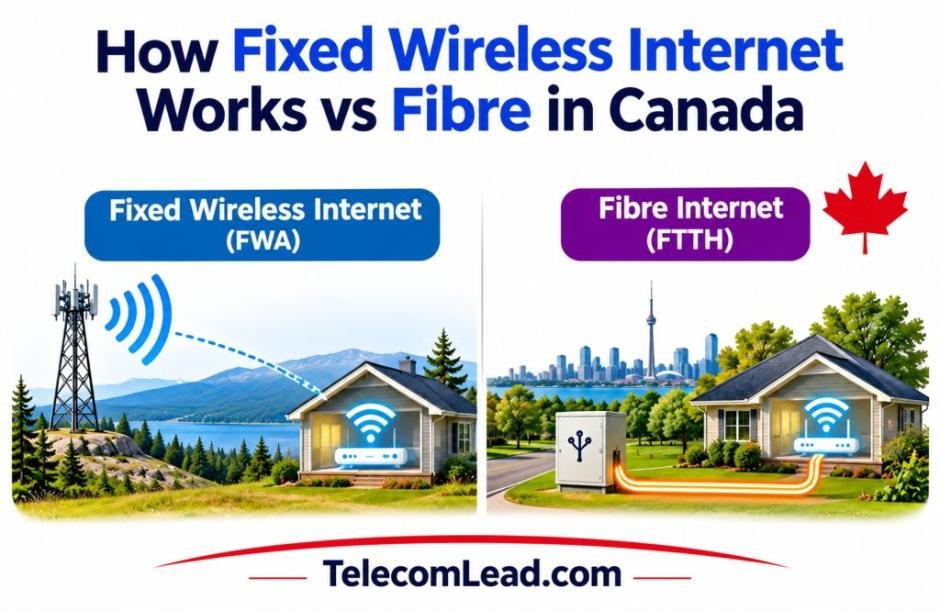
Fixed wireless delivers broadband over radio signals instead of buried cable. A tower sends that signal to a small antenna on your roof or window, and the antenna feeds a router inside the house. Speeds handle streaming, video calls and remote work comfortably, and installation usually takes days rather than months. Fibre still wins on raw capacity, but it reaches far fewer addresses, which is why many households never get the choice.
Introduction
You find the perfect place just outside town. The yard is bigger, the road is quieter, and the price per square foot is half what you would pay in the city. Then you ask the neighbour about internet and get a shrug. The cable company stops two concessions over, the copper in the ditch was strung up decades ago, and the dream property suddenly comes with a dial-up-era headache attached.
That gap is where fixed wireless internet built its reputation. Rather than waiting years for a crew to trench cable down a country road, a provider sends the connection through the air from a nearby tower to a small receiver mounted on your roof.
Plenty of households in that position end up happier than they expected. Knowing what actually happens between the tower and your router makes the trade-offs far easier to judge, starting with the part most people picture wrong.
What Happens Between the Tower and Your Router
Most people picture something like satellite: a dish aimed at the sky, beaming data into orbit and back. What actually happens is closer to a very long, very precise walkie-talkie conversation held entirely at ground level.
The Three Pieces of Hardware in a Wireless Setup
Every installation comes down to the same short equipment list:
- A base station on a tower, silo, grain elevator or tall building, connected to the wider network by fibre backhaul
- A receiver, usually an antenna about the size of a dinner plate, mounted on your roof, eave or exterior wall
- A router inside the house, fed by a single ethernet cable running in from that antenna
So how does fixed wireless internet work once the gear is bolted down? The base station and your antenna hold a dedicated radio link on licensed or unlicensed spectrum. Data travels as radio waves across that link, hits the receiver, converts back to a standard ethernet signal, and reaches your devices as ordinary Wi-Fi. The word “fixed” is doing real work in that name. Your antenna is aimed at one tower and stays there, which is what separates it from the cellular connection in your pocket.
Why Line of Sight Decides Almost Everything
Radio waves at these frequencies travel in straight lines and dislike obstacles. A clear view between tower and antenna produces a strong, stable link. Partial obstruction produces a weaker one. The usual culprits:
- Mature poplars and spruce along a property line
- A ridge, coulee or grain bin sitting between you and the tower
- Heavy, wet snow clinging to the face of the receiver
- New construction going up across the road
This is why installers run a site survey before quoting anything. The answer is specific to your roofline, not your postal code.
What Moves Your Real-World Speed
Posted plan speeds assume good conditions. Four factors push the real number around:
| Factor | Effect on performance |
| Distance from tower | Signal strength drops the farther out you sit |
| Obstructions | Trees and terrain scatter the signal and cut throughput |
| Spectrum type | Licensed bands face less interference than shared ones |
| Tower load | Heavy evening use among nearby subscribers slows everyone |
Anyone comparing the plans that fixed wireless internet Alberta providers advertise should treat the headline figure as a ceiling rather than a promise. Ask what customers on the same tower typically see at eight in the evening, not at ten in the morning.
Fixed Wireless Broadband Set Beside Fibre
The honest comparison of fixed wireless vs fibre looks like this:
| Fixed wireless | Fibre | |
| Download speed | 25 to 300 Mbps typical | 500 Mbps to 3 Gbps |
| Upload speed | Slower than download | Matches download |
| Latency | 10 to 40 ms | 1 to 10 ms |
| Install timeline | A few days | Weeks to years, if ever |
| Weather sensitivity | Mild, in extreme storms | None |
| Availability | Broad, including acreages | Dense areas and new builds |
Fibre is the stronger technology on paper and nobody serious argues otherwise. The catch is that the comparison only means something at addresses where both are on offer. For a large share of Canadian households, that list has exactly one name on it.
Which leaves the practical question of how to tell whether this suits your place before anyone climbs a ladder.
Working Out Whether a Wireless Link Suits Your Address
Choosing an internet connection has less to do with which technology wins on paper and more to do with what survives contact with your actual property. A few steps sort that out quickly.
Start With the Tower Question
Ask a provider which tower would serve your address and how far away it sits. A vague answer there tells you more than anything else in the sales call, because a company that knows its own network can name the tower without checking. Follow it with four more:
- What upload speed do you see on that tower in practice?
- Is there a data cap, and what happens once it is reached?
- What is the contract term, and what does the equipment cost to install?
- How are outages handled, and what is the typical response time?
Size the Plan to How the House Actually Runs
Upload capacity is the quiet dealbreaker for remote workers. Downloading a file is forgiving. Hosting a two-hour video call while somebody else pushes project files to a server is not. Households running several cameras, a home office and evening streaming should size up rather than shave a few dollars off the monthly bill.
Give the Installation a Fair Shot
Small physical choices make a measurable difference:
- Mount the antenna as high as the structure safely allows
- Trim branches that have grown into the signal path since the survey
- Put the router somewhere central indoors, not in a basement corner
- Keep the ethernet run short and properly sealed where it enters the wall
Build In a Backup if the Connection Pays the Bills
For anyone running a business from an acreage, a cellular backup that kicks in automatically costs little and removes the worst-case scenario entirely. Farm operations and home-based consultancies that depend on fixed wireless internet rural Alberta providers deliver often pair the main link with a modest LTE failover for exactly that reason.
Once the gear is up and the plan fits, the question stops being theoretical. It becomes a simple matter of whether the connection holds when you need it, which is the only test that has ever mattered.
What Reaches Your Roof Matters More Than What Wins on Paper
Search fixed wireless vs fiber online and you will find no shortage of articles declaring a winner. The more useful question is narrower. What reaches your roof, at what speed, and for what price?
For households sitting beyond the reach of buried cable, radio delivers a connection that handles remote work, streaming and everything else a modern home throws at it, often within a week of the first phone call. Clear line of sight, a nearby tower and a plan sized to your upload needs matter far more than the label on the technology.
Canada’s connectivity targets keep pushing coverage outward, and networks improve year over year. Until the trenching crews reach your road, a well-installed wireless link is a capable answer in its own right, and at plenty of addresses it stays the one worth keeping.