

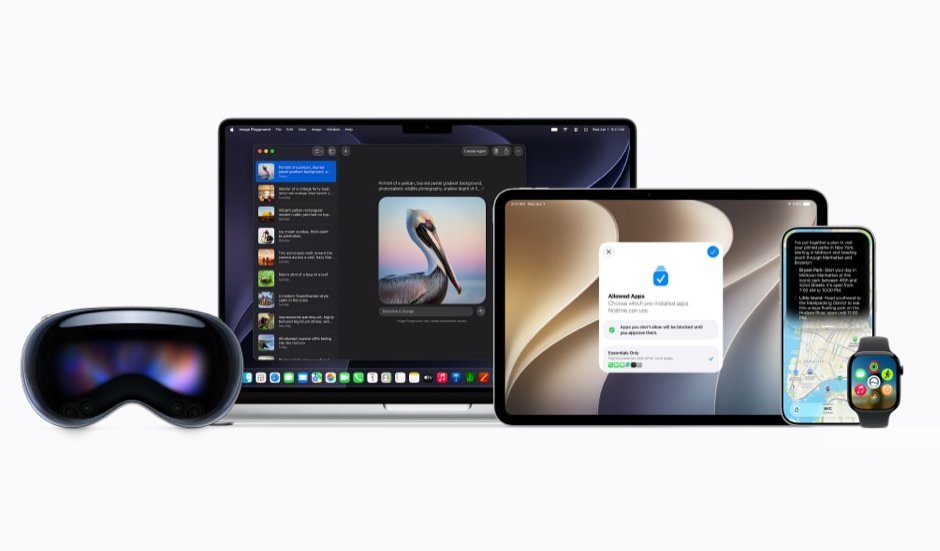
At the Worldwide Developers Conference (WWDC26), Apple unveiled a comprehensive “intelligence-first” strategy, fundamentally altering how mobile operating systems, developer tools, and service ecosystems function. By embedding next-generation AI architecture deep into iOS, iPadOS, macOS, and visionOS, Apple is setting a new industry standard for privacy-centric performance.

1. The Foundation: Apple Intelligence and Siri AI
Private Cloud Compute (PCC): PCC extends Apple’s hardware-level security into the cloud. It runs on dedicated Apple silicon servers that handle complex AI workloads too demanding for local processing. A core privacy guarantee is “stateless computation,” where data is processed in a transient memory space and erased immediately after the request is fulfilled. Apple has implemented “verifiable transparency,” allowing independent security researchers to inspect the code running on these servers. Users can also view their usage history via the new “Apple Intelligence Report” in Privacy & Security settings, which generates a transparent log of all cloud requests.
Siri AI Evolution: The revamped Siri is no longer a simple voice-command interface. It is a deeply integrated “agent” capable of cross-app context awareness. By drawing on personal data—such as specific threads in Messages, context in Mail, or locations in Photos—it can perform multi-step tasks. It also features a new dedicated conversational app that syncs history across all iCloud-connected devices, ensuring users can pick up a complex task from their iPhone and finish it on their Mac.
Hardware and Availability: Developer beta releases commenced on June 8, 2026. The intelligence features require high-performance hardware, specifically the iPhone 15 Pro/16 series, M-series chipsets for iPads and Macs, the Apple Vision Pro, and Apple Watch Series 9 or later. This hardware requirement ensures sufficient on-device neural engine capacity for real-time AI inference.
2. Everyday Intelligence: Smarter Apps and Parental Controls
Creative Tools: The Image Playground app allows for a multimodal creative process. Users can combine up to seven distinct elements—themes, costumes, expressions, or people from their own photo library (provided the person is named in the Photos app). Beyond the standalone app, these creative tools are integrated directly into Messages and Freeform, allowing for the generation of photorealistic or illustrative images based on specific text prompts.
Productivity: Safari is now “intelligence-aware,” featuring automatic tab organization that clusters related topics. Furthermore, it introduces natural language extension generation, allowing users to describe a functional browser tool and have the system build it. In Photos, Spatial Reframing leverages AI to adjust the composition of an image after the fact, while a new “Clean Up” tool can intelligently remove background photobombers or unwanted objects.
Family Safety: Apple has overhauled Screen Time to focus on digital well-being. ”Time Allowances” allow parents to set aggregate limits across broad categories like “Social Media” or “Games,” rather than just individual apps. The “Ask to Browse” feature adds a granular layer of permission for web access. Additionally, the expanded Communication Safety features utilize on-device machine learning to intercept and blur gore or graphic violence in incoming images or videos, augmenting the existing nudity-detection protocols.
3. Siri AI: The Agentic Assistant
Onscreen and Visual Awareness: Siri AI is now equipped with a “Visual Intelligence” layer. It can analyze the current UI of an app or a document to answer context-aware questions. On the Apple Vision Pro, this extends to the physical environment; users can simply look at a real-world object or virtual window and invoke Siri to perform actions related to that specific visual target.
Systemwide Writing Tools: The AI’s linguistic capabilities are now system-native. It can rewrite text to match a specific professional tone, proofread for grammatical consistency, or summarize lengthy documents. Because this operates at the OS level, it functions inside most third-party applications, providing a consistent UX regardless of where the user is typing.
Dedicated Hub: The new Siri app serves as a centralized “memory” for AI interactions. Users can revisit multi-turn conversations and re-prompt or edit previous instructions. This data is privately synced via iCloud, bridging the gap between mobile and desktop AI workspaces.
4. Intelligence Across Services
Maps and Find My: Maps has been enhanced with AI-generated high-resolution Flyover 3D imagery. The “Local Lists” feature identifies trending establishments or services, which is currently limited to the U.S. market. The Find My app has undergone a major redesign for watchOS; it now acts as a single, unified, map-centric interface that combines device, item, and people tracking. It also supports highly granular location-sharing, where users can set specific expiration times (e.g., share location for exactly two hours).
Wallet and Media: The Wallet app now integrates “Visual Intelligence” to parse receipts. If a user scans a receipt for a group meal, Apple Cash can suggest split-payment amounts. In the media space, video podcast support is now fully integrated into macOS and tvOS, allowing for higher-fidelity viewing experiences across the desktop and living room environments.
5. Developer Tools: Xcode 27 and Intelligence Frameworks
Agentic Coding: Xcode 27 marks a shift toward AI-assisted software engineering. The IDE now hosts coding agents that can handle complex, multi-turn reasoning to write boilerplate, refactor legacy code, or create new features. The new Device Hub acts as a virtual testing laboratory, allowing these agents to “test” code by interacting with app simulators in real-time.
Performance and Integration: Developers can now use the Model Context Protocol (MCP) to plug their development environment into external data sources like Figma, GitHub, or Jira. This allows the AI to “see” design files or bug reports while writing code. The Agent Client Protocol (ACP) ensures that any compatible AI agent can interact with the IDE’s tools.
Economic Incentives: Apple is lowering the barrier for AI adoption by providing the “App Store Small Business Program” members (under 2 million downloads) with free access to server-side Apple Foundation Models. This eliminates the prohibitively expensive API costs usually associated with running cloud-based LLM inference.
6. Regulatory Standoff: Siri AI Delayed in the EU
Security Concerns: The delay stems from a fundamental disagreement with the European Commission regarding the Digital Markets Act (DMA). Apple argues that the DMA, under an “extreme interpretation,” requires the company to allow third-party AI assistants to bypass standard security sandboxes. Apple posits that granting “unfettered” access to private device data and the ability to autonomously control third-party apps creates a massive security vulnerability for data theft.
Trusted System Agent: To reconcile security with the law, Apple proposed a “Trusted System Agent”—a secure gateway that would have allowed third-party assistants to access the same system-level features as Siri AI without violating user privacy. The European Commission rejected this proposal, leaving no clear path for integration.
Platform Split: While iPhone and iPad users are excluded, the features will ship on macOS, visionOS, and watchOS in the EU. This highlights a strategic decision by Apple to protect its most vulnerable (mobile/personal) platforms from the regulatory requirements it deems a threat to user security.
7. App Store: Scaling and Discovery
Marketing Tools: A new Asset Library in App Store Connect acts as a centralized repository for promotional content. Developers can decouple their marketing assets (screenshots, preview videos) from binary updates, allowing them to rapidly swap out seasonal creative without waiting for the full app-review process.
Monetization and Subscriptions: StoreKit 2 is being expanded to support “Subscription Suites,” which allow developers to package multiple app subscriptions into a single price point—even across different developers—facilitating a new class of subscription bundles. The new Retention Messaging tool allows developers to present “win-back” offers or explain the value proposition of a subscription at the exact moment a user attempts to cancel, reducing churn through non-intrusive communication. Discovery: The store is introducing “Personalized Collections” and “App Notes.” These are editorial-style recommendations that provide a human-readable explanation for why a specific app is being suggested (e.g., “Recommended because you enjoy strategy games and download similar RPGs”). This adds a layer of transparency to the store’s recommendation engine.
FASNA SHABEER