

Video delivery used to be a question of infrastructure. Cable headends, satellite transponders, set-top boxes, and a programming schedule someone negotiated months in advance. The apps people reach for now in the Video Players and Editors category sit on top of that plumbing instead of replacing it, and they treat the network as a pipe rather than a broadcaster.

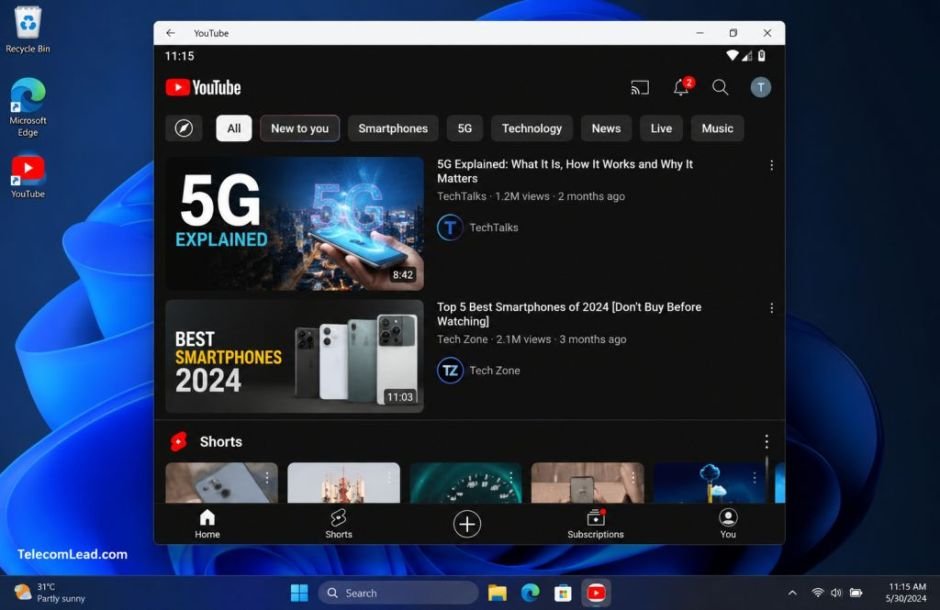
That shift matters to anyone working in telecom or content distribution: the delivery layer is increasingly an app, and the app is increasingly the thing subscribers think of as television.
Where YouTube sits inside “Video Players and Editors”
Walk through any store listing under Video Players and Editors and you find two distinct kinds of software wearing the same label. One kind is a local player: it opens a file, decodes it, and gets out of the way. The other kind is a delivery client, tied to a service, a recommendation engine, and a content library that lives somewhere else entirely.
Operators care about the second kind. A delivery client is what determines whether a subscriber’s 500 Mbps line feels fast, whether adaptive bitrate switching is smooth on a congested node, and whether the video session terminates on a phone, a laptop, or a TV over a cast handoff.
The category has also absorbed functions that used to require separate tools. Uploading, basic editing, commenting, and playlist management now sit inside the same client that handles playback. That consolidation is why a single app can plausibly stand in for a channel lineup.
What the official YouTube app covers
The official YouTube app, published under the name Google LLC, is straightforward about its scope. Its own description frames it as a way to see what the world is watching, from music videos to trending gaming, entertainment, and news content, on phones and tablets.
Underneath that summary is a fairly wide feature set. Subscriptions, playlists, comments and shares, uploading and editing your own videos, and casting to a TV all live inside the app rather than in separate companion tools. Navigation is built around tapping an icon or swiping between recommended videos, subscriptions, and your account.
The “watch on any device” line is the part that matters most from a distribution perspective. Session state, watch history, and subscriptions follow the account, not the hardware. For anyone modelling how households consume video across a broadband connection, that account-level continuity is the unit of measurement, not the device count.
If casting is the feature you rely on, note that it depends on the client and the TV sitting on the same local network, which is exactly the detail that trips people up when they download YouTube for PC and run it inside an emulator that defaults to a NAT network adapter instead of a bridged one.
Where it fits for telecom and cable readers
Three things make the app relevant beyond the consumer angle:
It behaves as a broadcast endpoint for channels that never touched a traditional distribution deal, which changes what “carriage” means.
Its casting support turns any commodity screen into a receiver, reducing the role of dedicated set-top hardware.
Upload and editing inside the app lower the barrier for regional and community broadcasters who previously needed a facility.
None of that is speculative. It is a description of features listed in the app itself, viewed through the lens of people who plan networks and content pipelines for a living.
Getting YouTube’s Android app running on Windows
There is a browser version of YouTube, and for most viewing it is the sensible choice. The reason to run the Android app on Windows instead is when you want the app’s behavior: the mobile layout, the swipe-based navigation between recommendations and subscriptions, the app-level casting stack, or app-side testing for a product that has to coexist with it.
That is a real use case for QA engineers, support teams at operators who field “the app is buffering” tickets, and anyone documenting the mobile experience while working on a desktop.
BlueStacks is the usual route for this. Once the Android environment is running, two settings do more for YouTube than anything else you can tweak.
Bridged networking and the GPU renderer
Network adapter mode. Set the virtual machine to bridged networking rather than NAT if you want cast discovery to find TVs and streaming sticks on your LAN. On NAT, the app will show no cast targets and give you no useful error.
Graphics backend and resolution. YouTube’s player leans on hardware decoding. Choosing the GPU-accelerated renderer and setting a resolution that matches your monitor stops the app from upscaling a phone-shaped 1080p canvas into something soft and stuttery on a large display.
Beyond those, the app runs about as you would expect. Playback is smooth on modern hardware, keyboard input works for search, and the mouse maps cleanly to taps because YouTube’s interface was never built around fast gestures in the first place.
Picture-in-picture and background playback behave differently inside an emulator than on a phone: the host OS window manager, not Android, decides what happens when you click away. If your workflow depends on audio continuing while you work in another window, test that early rather than assuming it carries over.
Support desks, QA teams, and everyone else
The desktop setup is not for casual viewing, and pretending otherwise would be silly when a browser tab does the job just as well.
It earns its place for people who need the Android client itself: support staff at an ISP reproducing a subscriber’s buffering complaint on the exact app build the customer has, developers checking how their own service hands off to YouTube casting, and content teams reviewing uploads through the same mobile interface their audience uses. For everyone else, the phone remains the natural home for it.